# Beyond LCP: How Images Cause CLS and Hurt INP (2026)
> Images touch all three Core Web Vitals, not just LCP. How images cause Cumulative Layout Shift, where they hurt Interaction to Next Paint, and the exact fixes.
_Source: https://theimagecdn.com/docs/how-images-affect-cls-and-inp_
_Published: 2026-07-03 · Updated: 2026-07-03 · By Sunny Kumar_
Most image performance advice stops at LCP. That leaves two-thirds of Core Web Vitals unattended.
Images do not only decide how fast your hero paints. They also decide whether your layout jumps while people read, and they can quietly add to the delay between a tap and a response.
If you have already optimised [Largest Contentful Paint](https://theimagecdn.com/docs/do-image-cdns-improve-lcp) and your field data still shows red, an image is often the reason — just not the way you expected.
**TL;DR:** Images cause **Cumulative Layout Shift (CLS)** when they load without reserved space, pushing content down. They add to **Interaction to Next Paint (INP)** when a huge file decodes on the main thread and blocks the frame that answers a tap. Fix CLS with `width`/`height` or `aspect-ratio`. Fix the image side of INP with smaller, modern files — which is exactly what a CDN delivers.
> **My verdict**
>
> CLS is where images do the most damage after LCP, and it is almost fully preventable in markup. INP is mostly a JavaScript problem, but oversized images make it worse. An image CDN helps the byte and decode side of both — it will not set your image dimensions for you.
---
## Why Is LCP Only One-Third of the Image Story?
Core Web Vitals is three metrics, and images touch all three.
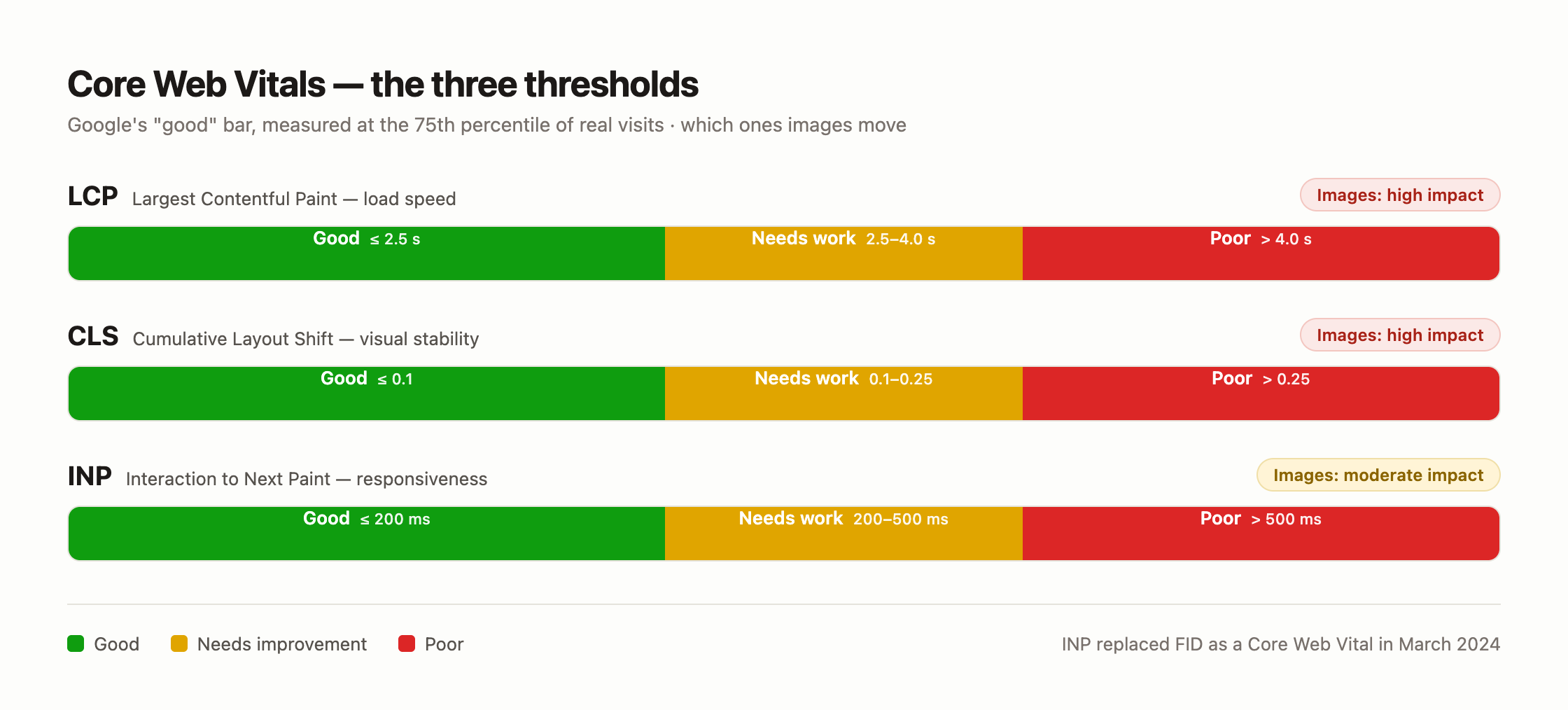
- **LCP** measures loading — often a hero or product image.
- **CLS** measures visual stability — how much the page jumps while it loads.
- **INP** measures responsiveness — the delay from an interaction to the next painted frame.
LCP gets all the attention because it is the easiest to explain and the easiest for a CDN to move. But a page can have a fast LCP and still fail the assessment because content jumps around (CLS) or taps feel sluggish (INP).
Google assesses each metric at the **75th percentile** of real visits. So one metric in the red is enough to mark the URL as "needs improvement." Fixing LCP alone does not get you a passing grade.
---
## How Do Images Cause Cumulative Layout Shift (CLS)?
An image causes layout shift when the browser does not know how big it will be before it loads.
Without dimensions, the browser lays out the surrounding text first, then the image arrives and shoves everything below it down the page. That downward jump is the layout shift.
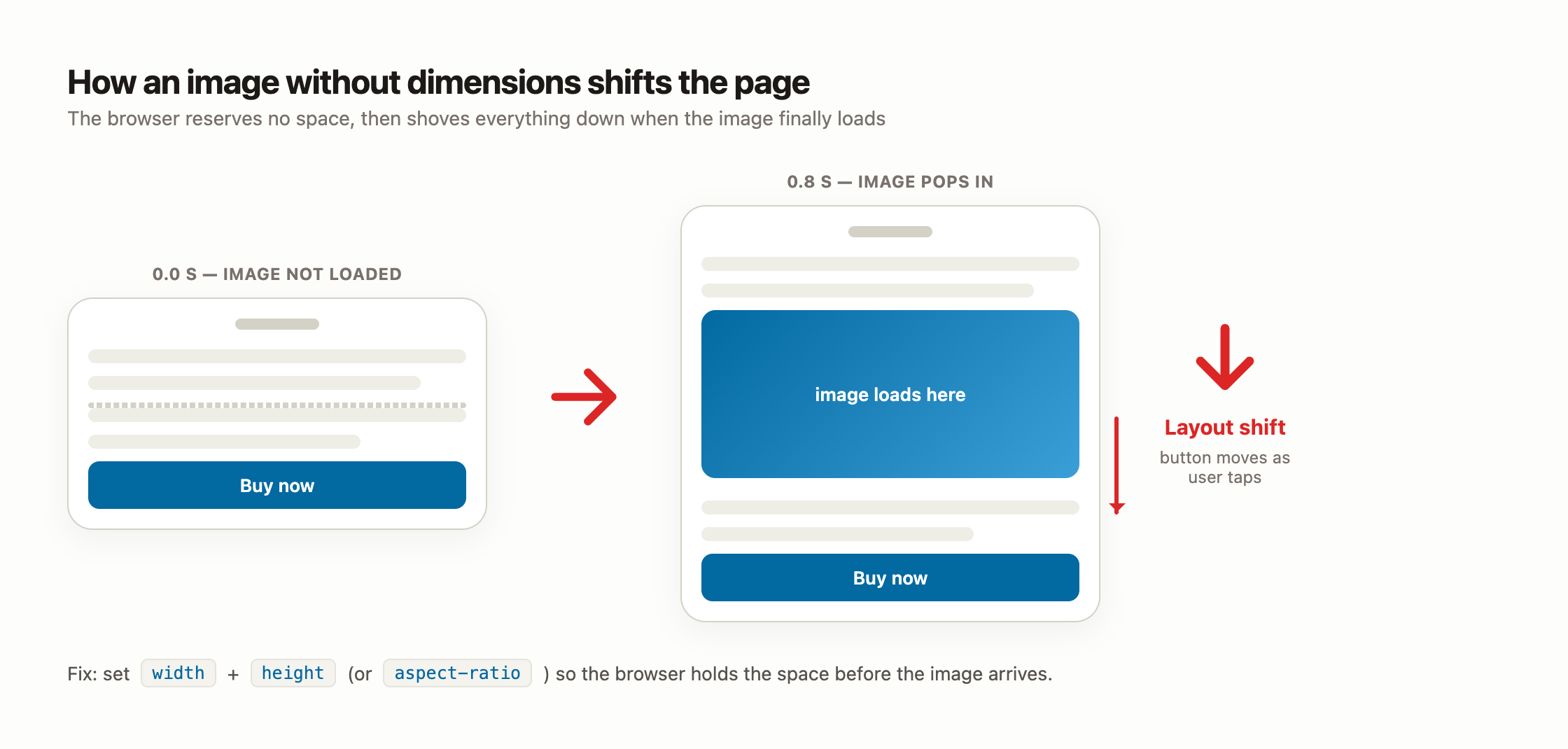
This is worse than it looks. The shift usually happens in the first second, right when someone is about to tap a button or start reading. On slow connections the image lands even later, so the jump is bigger.
The [web.dev CLS optimization guide](https://web.dev/articles/optimize-cls) is direct about the fix: always include `width` and `height` attributes on images, or reserve the space with CSS `aspect-ratio`. Modern browsers use those attributes to compute an aspect ratio and hold the space before a single byte of the image arrives.
---
## What CLS Score Counts as Good?
Google's thresholds for CLS are stricter than people assume, and the number is unitless — it is a score, not seconds.
| CLS score | Rating | What it means |
| --- | --- | --- |
| **0.1 or less** | Good | Layout is stable; images reserve their space |
| **0.1 – 0.25** | Needs improvement | Noticeable jumps, usually from images or ads |
| **Greater than 0.25** | Poor | Content moves enough to frustrate or misdirect taps |
These ratings are measured at the 75th percentile across mobile and desktop, according to [web.dev's CLS reference](https://web.dev/articles/cls). One unsized hero image on a slow mobile connection can push a whole template past 0.1 on its own.
> **Observation:** The most common CLS offender I see is not ads — it is a WordPress theme that outputs `![]() ` tags without `width` and `height` because the images were added by hand or through a page builder.
---
## What Is the Exact Markup That Stops Image Layout Shift?
You have two reliable options. Both tell the browser the shape of the box before the image loads.
**1. Width and height attributes**
Set the intrinsic pixel dimensions. CSS can still make the image responsive — the attributes only supply the aspect ratio.
```html
 ```
```css
img {
max-width: 100%;
height: auto; /* keeps the ratio from width/height while scaling */
}
```
**2. The `aspect-ratio` property**
When you cannot set attributes — a CSS background, an `` with art direction, or a container — reserve space with CSS instead.
```css
.hero {
aspect-ratio: 16 / 9;
width: 100%;
}
```
Either way, the browser holds the exact space. When the image finally loads, it drops into a slot that was already there, and nothing below it moves. If you also serve responsive sizes through a CDN, keep the `width`/`height` matched to the aspect ratio, not to every rendered size.
---
## Can Images Really Hurt INP?
Let me be honest here, because a lot of articles overstate this. INP is mostly a **JavaScript** problem — event handlers, long tasks, heavy re-renders. Images are not the main character.
But images have a real, measurable supporting role, and it shows up in three ways.
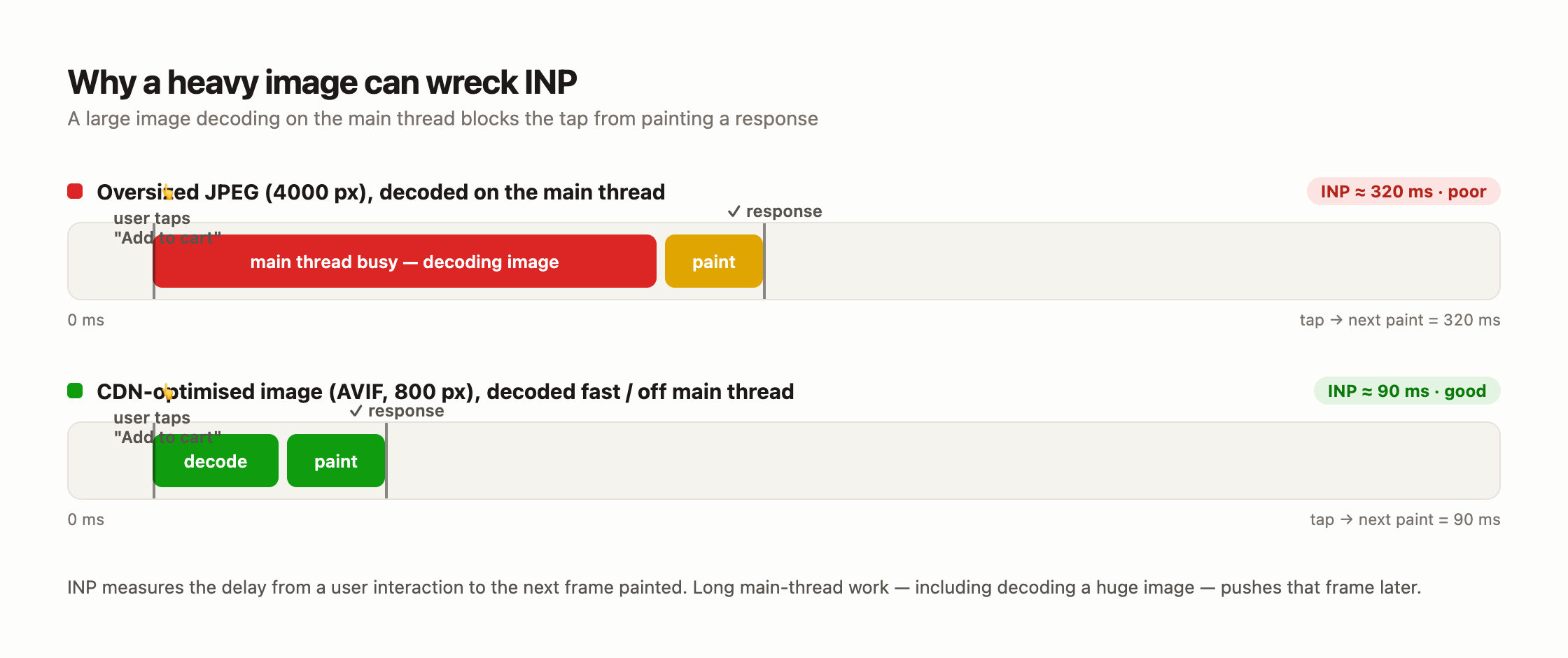
**1. Main-thread image decoding.** A large image (say a 4000px JPEG) has to be decoded before it paints. That decode can run on the main thread, and while it runs, the browser cannot paint the frame that answers a tap. The [web.dev INP optimization guide](https://web.dev/articles/optimize-inp) explains that any long main-thread task delays the next paint — a big decode is one of those tasks.
**2. Lazy-loading and gallery JavaScript.** Carousels, lightboxes, and infinite-scroll galleries run JavaScript on interaction. Feed them huge source images and each swipe or tap does more work.
**3. Heavy DOM from too many images.** Hundreds of image nodes inflate the DOM, and a large DOM makes every interaction more expensive to process.
A good INP is **200 ms or less**; poor is over **500 ms**, per [web.dev](https://web.dev/articles/inp). INP [replaced First Input Delay as a Core Web Vital in March 2024](https://web.dev/blog/inp-cwv-launch), so this is a live ranking signal, not a lab curiosity.
---
## How Does an Image CDN Help CLS and INP?
An image CDN helps the parts of these metrics that come down to bytes and decoding. It does not touch the parts that come down to your markup.
**Where a CDN genuinely helps:**
- **Smaller files decode faster.** Serving [WebP or AVIF](https://theimagecdn.com/docs/webp-vs-avif-vs-jpeg) instead of a giant JPEG cuts decode time, which is the image side of INP.
- **Right-sized images.** A CDN that resizes to the rendered width means the browser is not decoding a 4000px image into a 800px slot.
- **Fewer bytes on the network** frees the main thread sooner during load.
**Where a CDN cannot help:**
- It will not add `width` and `height` to your `
![]() ` tags. That is on your template.
- It will not fix layout shift from ads, embeds, or web fonts.
- It will not fix INP caused by your own JavaScript.
So the honest split is simple. Markup fixes CLS. A CDN plus markup fixes the image side of INP. If your CDN already looks fast but the metrics stay red, read [why an image CDN might not be improving your scores](https://theimagecdn.com/docs/why-image-cdn-not-improving-lcp) — the cause is usually discovery or markup, not the CDN.
> **Quick note:** If you are testing providers, BunnyCDN keeps this cheap. Sign up through [this link](https://try.sunnysah.com/BunnyCDN) with coupon code **THEWPX** for $5 in free credit and switch on Bunny Optimizer to auto-serve WebP/AVIF.
---
## What Is the Checklist to Protect CLS and INP with Images?
Run this before you call a page done. It covers both metrics.
- Every `
![]() ` has `width` and `height`, or its container has `aspect-ratio`.
- Hero and background images reserve space in CSS.
- Responsive images use `srcset`/`sizes` so the browser downloads the right size.
- Source files are [WebP or AVIF](https://theimagecdn.com/docs/webp-vs-avif-vs-jpeg), resized to the rendered dimensions, ideally through a CDN.
- Below-the-fold images use [lazy loading](https://theimagecdn.com/docs/lazy-loading-image-cdn) — but never the LCP image.
- Galleries and carousels are fed CDN-resized images, not full originals.
- You tested on **mobile field data**, not just a desktop lab run.
The theme of the list is the same as everywhere in performance: reserve space early, ship fewer bytes, and keep heavy work off the main thread.
---
## Frequently asked questions
### Do images affect CLS or only LCP?
Images affect both. LCP measures how fast the largest image or text block loads. CLS measures whether images shift the layout as they load. An image with no reserved space is one of the most common CLS causes, even on a page with a fast LCP.
### What CLS score is considered good?
A CLS of 0.1 or less is good, 0.1 to 0.25 needs improvement, and above 0.25 is poor, measured at the 75th percentile of real page loads. CLS is a unitless score based on how much visible content moves, not a time in seconds.
### How do I stop images from causing layout shift?
Give every image `width` and `height` attributes so the browser can compute its aspect ratio and reserve space before loading. When attributes are not possible, use the CSS `aspect-ratio` property on the container. Both hold the exact space so nothing jumps when the image arrives.
### Do images affect INP?
Yes, but modestly. INP is mostly driven by JavaScript. Images add to it when a large file decodes on the main thread and delays the paint that answers an interaction, or when heavy galleries run more work on oversized source images. Smaller, modern, right-sized images reduce that cost.
### Does an image CDN improve CLS?
Only indirectly. A CDN sends smaller, correctly sized files, but it does not add width and height to your markup, and missing dimensions are the main CLS cause. Fix the markup for CLS; use the CDN to cut bytes and decode time, which helps LCP and the image side of INP.
### Is INP still a Core Web Vital in 2026?
Yes. INP replaced First Input Delay in March 2024 and remains one of the three Core Web Vitals alongside LCP and CLS. A good INP is 200 ms or less at the 75th percentile, so it is a live ranking and user-experience signal.
## Summing Up!
LCP is the loud metric, but it is only one of three. Images quietly decide CLS through reserved space, and they add to INP through decode cost on the main thread.
The good news is that most of this is preventable without new tools. Set `width` and `height` (or `aspect-ratio`) on every image, and you remove the single biggest image-driven CLS cause. Serve smaller, modern, right-sized files — the job an image CDN is built for — and you cut the decode time that feeds INP.
My recommendation: fix the markup first, because it is free and it fixes CLS outright. Then add an [image CDN](https://theimagecdn.com/docs/best-image-cdns) to handle bytes, format, and sizing so all three Core Web Vitals move in the same direction.
## Sources
- [A good CLS score is 0.1 or less, and a poor score is greater than 0.25, measured at the 75th percentile of page loads.](https://web.dev/articles/cls)
- [To avoid layout shifts, always include width and height size attributes on images, or reserve the space with CSS aspect-ratio.](https://web.dev/articles/optimize-cls)
- [A good INP score is 200 milliseconds or less, and a poor score is greater than 500 milliseconds, at the 75th percentile.](https://web.dev/articles/inp)
- [Interaction to Next Paint replaced First Input Delay as a Core Web Vital in March 2024.](https://web.dev/blog/inp-cwv-launch)
- [Long tasks on the main thread delay the browser from painting a response to a user interaction, which worsens INP.](https://web.dev/articles/optimize-inp)